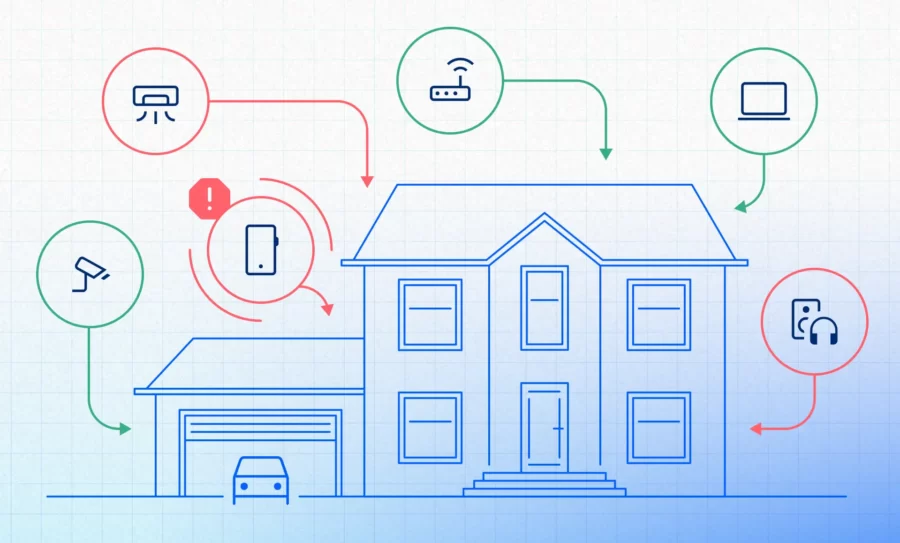
Modern home networks have evolved far beyond a single router and a couple of laptops. In 2026, even an average household resembles a small enterprise: dozens of devices, multiple admins, cloud-connected services, smart sensors, remote access tunnels, and overlapping Wi‑Fi networks. That complexity delivers convenience – but it also creates an attack surface most people never fully see.
As these environments expand, strengthening your fundamental home cybersecurity practices becomes essential, especially as a baseline for understanding the deeper risks hiding inside a modern home network.
And that’s the real shift: the most serious home network threats often come from inside the network. Not from a remote hacker hammering your firewall, but from devices and configurations already trusted behind it.
As more homes adopt smart tech, threat actors increasingly treat residential networks as soft targets. They know users rarely monitor internal traffic, audit devices, or review router logs. That makes home networks ideal hiding places for silent compromise.
This article breaks down the biggest home network threats you’re likely to face today, how they actually work, how to spot early warning signs before an attack succeeds and – most importantly – why tools like Fing can help surface those threats even when they’re hiding in the background.
Rogue and Unknown Devices on the Network
How the threat works
Rogue devices enter a home network more easily than most people realize. A neighbor’s phone automatically connecting to your Wi‑Fi because you once shared the password; a guest device that was never removed; a cheap IoT gadget with a default credential set; even a laptop belonging to a previous tenant that reconnects via saved credentials.
Once connected, a rogue device gains access to internal IP space and can:
- Enumerate other devices
- Scan open ports
- Intercept unencrypted traffic
- Probe for weak services (SMB, UPnP, DLNA, old NAS shares)
In a business, these behaviors trigger alarms. At home, they often go unnoticed for years.
Why it’s dangerous at home
Homes rarely have segmentation, meaning a single rogue device sits on the same flat LAN as personal laptops, workstations with sensitive company data, smart TVs, or even VPN-connected work devices.
A malicious or infected rogue device can pivot freely within a network, undermining home network security by exploiting the lack of internal segmentation.
Common warning signs
- A device name you don’t recognize
- A MAC address from a suspicious vendor
- Intermittent Wi‑Fi slowdowns caused by scanning activity
- New DHCP leases you don’t remember authorizing
- Router logs showing repeated reconnects from old devices
Most users don’t review DHCP tables or router logs, which means rogue devices often remain invisible.
Compromised IoT Devices
How the threat works
IoT devices – cameras, smart plugs, air purifiers, refrigerators, lights – are notorious for weak firmware, hardcoded credentials, and abandoned security updates. They are also online 24/7 and typically have direct cloud connections.
Threat actors routinely deploy automated botnets that scan the internet for vulnerable IoT firmware. Once exploited, these devices can:
- Join botnets (Mirai variants remain highly active)
- Relay traffic into the rest of your LAN
- Capture local network metadata
- Open outbound tunnels for remote control
- Host malware payloads
Importantly, compromised IoT devices rarely show user-visible symptoms.
Why it’s dangerous at home
Homes rely heavily on security cameras and baby monitors, which should be trusted devices but often become the weakest link. And because IoT gadgets are treated as appliances – set once and forgotten – they rarely receive manual updates.
Common warning signs
- IoT device waking the network with excessive chatter
- Unknown outbound connections
- Unexplained port exposure from UPnP auto‑forwarding
- Increased router CPU usage
- Device online at unusual hours or with abnormal traffic patterns
Because most home users don’t inspect traffic flows, these warning signs stay buried.
Weak Router Configurations and Outdated Firmware
How the threat works
Routers are the gateway and the single point of failure for most homes. Yet many are shipped with insecure defaults:
- Outdated firmware
- UPnP enabled by default
- Default admin usernames
- Unencrypted management channels
- Weak or obsolete Wi‑Fi security modes
- WAN-accessible admin panels
Attackers often target routers because a compromise grants full control over:
- DNS settings
- Traffic routing
- Device visibility
- Internal scanning
Once inside, an attacker can persist quietly for months.
Why it’s dangerous at home
A hijacked home router can impersonate legitimate internet services (via DNS poisoning), harvest credentials, or funnel all your traffic through malicious proxies. Most users assume the router is secure simply because “it came from the ISP.”
Common warning signs
- Router admin page loading slowly or behaving oddly
- Wi‑Fi security mode set to WPA/WPA2 mixed or WEP
- DNS changing without your input
- Unknown port-forwarding rules
- Frequent router reboots
- Firmware version years out of date
Wi‑Fi Hacking Risks
How the threat works
Attackers rarely try to break through a modern firewall head‑on. Instead, they focus on Wi‑Fi – because home networks often use weak or reused credentials.
Common Wi‑Fi threat vectors include:
- Credential reuse (sharing passwords with guests or neighbors)
- Brute-force attacks against weak passphrases
- Captive portal phishing
- Downgrade attacks against older encryption modes
- Evil twin or rogue access points imitating your SSID
Once authenticated, an attacker becomes a trusted internal device.
Why it’s dangerous at home
Homes typically maintain a single Wi‑Fi password for years. If it’s shared with guests, stored on old devices, or leaked, Wi‑Fi becomes the easiest entry point.
Many devices still operate on WPA2 with weak passphrases. Attackers can capture Wi‑Fi handshakes and attempt offline cracking without ever touching your router again.
Common warning signs
- “Hidden” duplicate SSIDs
- Wi‑Fi disconnects or deauth floods
- Unexpected devices connecting at odd hours
- Signal interference near your home
- New DHCP clients assigned without interaction
Few home users check their Wi‑Fi client lists regularly.
Lateral Movement Between Trusted Devices
How the threat works
Once an attacker gains a foothold – through a rogue device, compromised IoT gadget, or weak Wi‑Fi – they often move laterally. This mimics enterprise‑grade techniques:
- SMB vulnerabilities
- mDNS enumeration
- ARP spoofing
- Man‑in‑the‑middle attacks
- Remote desktop brute-force attempts
- Searching for unpatched Windows/Mac/Linux services
Homes usually contain a mix of old and new devices, and older ones make ideal pivot points.
Why it’s dangerous at home
A compromised internal device can escalate into:
- Stolen work documents
- Exfiltration of browser-stored passwords
- Access to home cloud backups
- Interference with smart home automation
- Hijacking of personal email or digital identity
Because internal devices implicitly trust each other, lateral movement often feels “silent.”
Common warning signs
- Devices waking or communicating unexpectedly
- Unexplained RDP or SSH login attempts
- Disabled antivirus or firewall notifications
- Random network pauses caused by ARP poisoning
- Abnormal traffic between devices that usually don’t interact
Most home networks lack monitoring tools that would flag these behaviors.
Shadow IT: Forgotten and Legacy Devices
How the threat works
Shadow IT isn’t just an enterprise problem. Homes accumulate devices: old phones, tablets, smart bulbs, secondhand cameras, forgotten Wi‑Fi extenders, printers, media boxes, and “temporary” guest devices.
Over time these devices fall out of support or remain connected with outdated firmware. Attackers scan specifically for these abandoned endpoints because they’re easy to exploit.
Why it’s dangerous at home
Many legacy devices store credentials or personal data and can be used as pivots into more sensitive systems. Because they’re forgotten, no one updates them, and no one checks whether they’re behaving normally.
Common warning signs
- Devices appearing online even though you haven’t used them in months
- Unknown device names in your DHCP table
- Devices that vanish and reappear during scans
- Wi‑Fi extenders using insecure modes
- Smart home hubs left running after you switched ecosystems
Shadow devices become blind spots that attackers love.
Why These Threats Go Unnoticed
The biggest challenge in defending a home network isn’t the number of threats – it’s the visibility gap. Most households have:
- No centralized device inventory
- No automated alerts for new network activity
- No real-time threat indicators
- No router configuration auditing
- No ability to detect anomalies across devices
Threat actors depend on this invisibility. The typical home network is noisy, diverse, and poorly monitored, which means suspicious behavior blends into everyday traffic patterns.
The solution isn’t to lock down your home like a data center. It’s to gain enough visibility to know what’s normal – and what isn’t.
How to Spot These Threats With Fing
Network scanners like Fing are purpose-built to close those visibility gaps. With device discovery, real‑time alerts, router security checks, and continuous monitoring, Fing gives you the kind of internal network awareness that most home setups simply can’t achieve on their own.
You can monitor your network continuously with Fing Desktop whenever it’s running, or enable true 24/7 protection using Fing Agent – available for Raspberry Pi, NAS systems, and Docker environments.
Here’s how Fing supports threat detection without adding complexity:
- Continuous device discovery
Know every device connected at any moment, including unexpected or unknown ones.
- Alerts for new or suspicious devices
Get notified instantly when something unfamiliar joins your Wi‑Fi.
- Historical monitoring
Track how your network changes over time and detect reappearing rogue devices.
- Router security and configuration checks
Spot weak Wi‑Fi encryption, open ports, and outdated firmware.
- Device fingerprints and behavior indicators
Identify the manufacturer, type, and potential security posture.
Visibility doesn’t solve the threats alone, but it gives you the awareness needed to take action – whether that’s updating firmware, removing a rogue device, tightening router settings, or segmenting IoT gadgets.
Conclusion
Home networks are no longer simple. They’re dynamic ecosystems of trusted, semi-trusted, and completely unknown devices—any of which can become a threat vector if you’re not watching closely.
The biggest home network threats today aren’t dramatic Hollywood-style hacks. They’re slow, quiet, internal compromises:
- Rogue devices blending in
- IoT gadgets hijacked without symptoms
- Weak Wi‑Fi security exploited from nearby
- Lateral movement that looks like legitimate traffic
- Forgotten devices creating long‑term vulnerabilities
Awareness and visibility are your most effective defenses. The more you can see, the faster you can respond. Your home network is an ecosystem. Understanding its threats is the first step toward taking control of it.